Sign-off ready programmes, in minutes, not weeks.
Plancore turns your bill of quantities, scope of work and drawings into a logic-linked, resource- and cost-loaded critical-path programme for Primavera P6, Microsoft Project or Asta Powerproject. Then it checks every update, forecasts the real finish date and builds the report.
Use it yourself as an affordable planning tool, or have our planners validate, analyse and control the programme for you. Specified, built and validated by engineers and planners with decades on live projects.
Run it yourself, or have planners run it with you
Some teams want an affordable tool to plan and control their own projects. Others need independent assurance, forensic analysis or a project controls team. Plancore does both, on the same platform and the same data.
An affordable planning tool for your own team
For contractors, developers and project managers who want to build, update and report on programmes themselves, without enterprise software prices or a planner on every job.
- Generate programmes from your BOQ, scope and brief
- Check every update and forecast completion
- Weekly reports, earned value and dashboards
- Export to P6, MS Project and Asta
Professional planners when the stakes are high
For clients, funders, consultants and contractors who need an expert opinion they can rely on, or an ongoing project controls function without hiring one.
- Programme validation and independent assurance
- Forensic delay analysis and extension of time
- Ongoing progress updates and project controls
- Programme recovery and planner on demand
Planning is hardest for the firms with the fewest planners
Planning AI has been built for megaprojects. Small and medium firms still build programmes by hand, write weekly reports on Friday afternoons and struggle to keep a planner employed between tenders.
No planning team to spare
Work comes in peaks, planners are expensive and hard to keep. Plancore and our planners on demand cover the gaps.
Programmes take days
Tender deadlines don't wait. Plancore builds the first programme from your BOQ in minutes.
Reports eat the week
Updates, checks, forecasts and report drafts rebuild themselves from each site return.
One platform from tender programme to final account
Most teams buy one tool to build the programme, another to check it and a third to report on it. Plancore keeps all of it on one dataset, so the baseline, every update, the earned value and the delay evidence always agree.
Build the programme
BOQ quantities × regional production rates give durations you can audit line by line. Logic, WBS, calendars, resources and costs come with it.
How generation works →Check every update
53 tests, including the DCMA 14-point assessment, on your own programmes or the contractor's monthly submission.
See the checks →Forecast the real finish
Monte Carlo, earned schedule and slip-trend forecasts side by side, with the chance of hitting the contract date.
See forecasting →Track cost and progress
Earned value from the same cost-loaded programme: SPI, CPI, S-curves and out-of-sequence progress.
See controls →Explain delay
Update-by-update comparison, critical path shifts and the evidence trail behind an extension of time claim or its defence.
See delay analysis →Report without the spreadsheet
Weekly and monthly reports, look-aheads and portfolio dashboards, plus a live feed to Power BI, Tableau or Domo.
See reporting →A real programme, open in Plancore
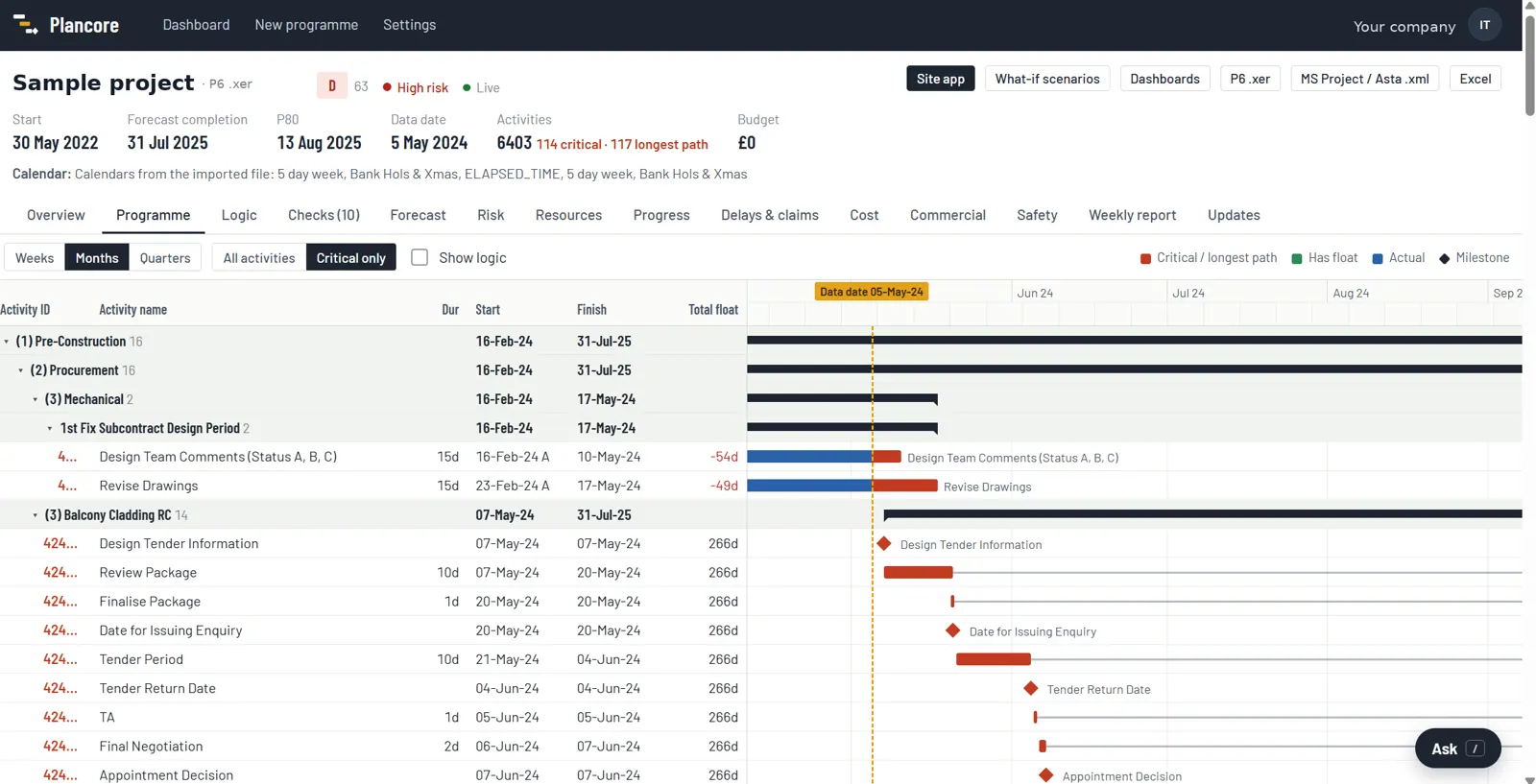
A 6,403-activity P6 programme imported, graded and forecast. The header shows the schedule grade, delay risk, forecast completion and P80 date; the tabs below run from logic and checks to delays, cost and the weekly report.
Built for the industry by the people who plan it
Plancore was not designed by software people guessing at construction. It was specified by engineers, builders and planners with decades of projects behind them, and every output is checked by practising planners in P6, Asta and MS Project before it ships.
Shows its working
Every duration lists the BOQ lines, rate, gang and regional factor behind it. Check it the way you would check a junior planner's programme.
Thinks in your tools
Calendars, activity codes, WBS and cost accounts land in P6, Asta and MS Project the way a planner would set them up.
Planners in the loop
Our planning team reviews generated programmes and feeds corrections back into the rates and logic rules. The platform gets better with every project.
Built for where you build
A programme for Leeds in January is not a programme for Doha in August. Plancore sets the working week, holidays, weather and productivity for where you build, and lets you set your own for any country.
United Kingdom
SME contractors, subcontractors, fit-out and housebuilders. Asta-first workflows, NRM and SMM7 bills, bank holidays and Met Office weather.
Plancore in the UK →Europe
Contractors and consultants delivering programmes in P6 or MS Project, with your country's working week, holidays and rates.
Plancore in Europe →Gulf
Contractors submitting P6 programmes to consultants. Saturday-to-Thursday weeks, summer heat bans and Ramadan working hours by country.
Plancore in the Gulf →Africa
Contractors, developers and consultants working from BOQs. Rainy-season working days and local construction methods.
Plancore in Africa →Send us a live project. We'll build the programme and run your updates for two months, free.
Places are limited in each region. Pilot projects help train Plancore on real site performance, under clear data terms.
Planning AI was built for megaprojects. Most projects aren't megaprojects.
Small and medium contractors deliver most of the built environment, usually without a planning department. These are the problems we hear most, and what Plancore does about each one.
The problems small and medium firms tell us about
Seven problems, each with the Plancore answer and the benefit you can expect.
You can't keep a planning team busy, or keep it at all
Planning work comes in peaks: tenders, contract award, a delay dispute. Between them a full-time planner is hard to justify, and good planners are expensive and hard to keep. When one leaves, the knowledge of how your programmes are built leaves too.
Planning capacity that scales with your workload
Plancore does the repetitive build, check and reporting work, so one planner covers far more projects, or a project manager covers them with no planner at all. When you need a senior planner, our assurance team steps in for that job only.
Benefit: pay for planning when you need it, not a permanent team between peaks.Programmes take days you don't have
A tender lands with ten days to return. Building a credible, logic-linked programme from the bill by hand takes a planner days, so it gets squeezed or replaced with a bar chart.
A first programme from your BOQ in minutes
Upload the bill, scope and a brief. Plancore sizes every activity from quantities and regional rates, links the logic and calculates the critical path. Your time goes on reviewing the sequence, not typing it.
Benefit: a tender or contract programme in hours of review instead of days of building.Weekly and monthly reports eat the week
Every update means statusing the programme, chasing site for progress, rebuilding charts and writing the same commentary again. On a busy job it takes most of a day, every week.
Reports that rebuild themselves from each update
Site teams record progress in the site app. Plancore statuses the update, runs the checks, refreshes the forecast and earned value, and drafts the report commentary for you to edit.
Benefit: the weekly report becomes a review, not a production job.Baselines get rejected and payments wait
A consultant or employer's agent rejects the programme for open ends, hard constraints or missing logic. Under NEC, an unaccepted programme can cost you a share of each payment.
Checked against 53 tests before anyone else sees it
Every programme and update is graded against 53 checks, including the DCMA 14-point assessment, with the failing activities listed so you can fix them before submission.
Benefit: fewer rejected submissions and fewer review cycles.You find out about the delay when it's too late
The programme still shows the contract date until the month it obviously can't be met. By then the options to recover are expensive or gone.
An honest forecast every update
Monte Carlo P50 and P80 dates, earned-schedule forecasts and the slip trend sit next to the CPM date, with the activities driving the risk named in plain English.
Benefit: months of warning instead of weeks.When time is disputed, the evidence isn't there
Updates were overwritten, logic changed without a record, and nobody can show when the critical path moved. Claims and defences are built from memory.
Every update kept, compared and explained
Plancore stores each update and logs what changed between them, so the delay story is ready. Our planners can turn it into an extension of time submission or response.
Benefit: a defensible position without paying for a reconstruction.Enterprise software doesn't fit your size
The best-known scheduling AI is sold to large owners and contractors through custom quotes, implementation projects and training workshops, and assumes you already run Primavera and have planners in-house.
Built and priced for small and medium projects
Start free with the pilot. Work from the BOQ you already have, export to P6, MS Project or Asta, and add our planners only where you need them.
Benefit: AI planning at a price and complexity that fits a single project.The gap enterprise scheduling AI leaves
The best-known scheduling AI platforms are strong products, designed around large owners and contractors running major capital programmes. Plancore is built for the projects and firms they are not designed around.
| What matters | Enterprise scheduling AI | Plancore |
|---|---|---|
| Designed around | Large owners, EPCs and main contractors running major capital programmes | Small and medium contractors, developers and consultants, with or without a planner |
| Assumes you have | An in-house planning team, Primavera, and often BIM models | A bill of quantities, a scope and someone who knows the job |
| Where the programme starts | An existing schedule to optimise or forecast, or a BIM model | Your BOQ quantities × regional production rates, plus your scope and brief |
| Scheduling tools | Mostly Primavera-centred | P6, Microsoft Project and Asta Powerproject |
| How you buy it | Custom quotes, enterprise contracts, implementation projects and workshops | Free founding pilot, then pricing set for single projects and small portfolios |
| People | Software only; your planners do the work | Software, plus optional validation, forensic analysis and project controls by our planners |
| Local working rules | Configured by your team | Built-in calendars for the UK, Gulf heat bans and Ramadan hours, and West African rainy seasons; your own for anywhere else |
Comparison describes the typical positioning of enterprise scheduling AI platforms as presented on their public websites, October 2026.
What Plancore adds that small and medium firms need
Starts from the bill you priced
Durations come from your BOQ quantities, so the programme, the cost and the earned value agree from day one, and every duration shows its working.
Asta as well as P6
Many UK SME contractors plan in Asta Powerproject or MS Project. Plancore exports to and imports from all three.
Software and planners in one place
Run it yourself, or bring in our assurance team for validation, forensic analysis or ongoing controls, on the same data.
One dataset, start to finish
Generation, checks, forecasts, earned value, reports and delay evidence in one platform rather than three tools.
Local rules built in
Working weeks, holidays, weather, heat bans and Ramadan hours set in the calendars, not left for you to model.
Priced for one project
No enterprise contract or implementation project to get started. Try it free on a live job first.
See the difference on one of your own projects
One programme built free, plus two months of progress updates.
Everything a planning team does, on one dataset
Generate, check, update, forecast, control, analyse, optimise and report. Plancore feeds the scheduling tools your team already uses rather than replacing them.
From bill of quantities to baselined programme
Upload a BOQ, a scope of work and drawings. Plancore classifies each item, sizes it from production rates for your region and builds a DCMA-ready network with a true critical path.
Upload the documents
BOQ in Excel, CSV, OpenDocument, Word or PDF, including scans. Add the scope of works and a planner's brief. Sections, ditto lines and provisional sums are read correctly.
Classify and rate
Each item maps to one of 95 work items and is sized from the rate library, adjusted for region, season and trade productivity.
Link logic, run CPM
Sequencing rules, zone flow and staged handoffs create the network. The CPM engine calculates dates, float and the critical path.
Export and baseline
P6 .xer and XML, MS Project XML (which Asta also opens) and Excel, with calendars, WBS, resources, costs and activity codes.
Tell it what you know
Write the brief the way you would to a planner: "Block B first. Max two plaster gangs. Steel is 12 weeks from order. Roof watertight before winter." Plancore reads the brief and the scope of works and proposes key dates, long-lead items, approvals, missing activities, sequence and crew limits.
Durations still come from the BOQ quantities and your production rates, and you approve every proposal before anything is created.
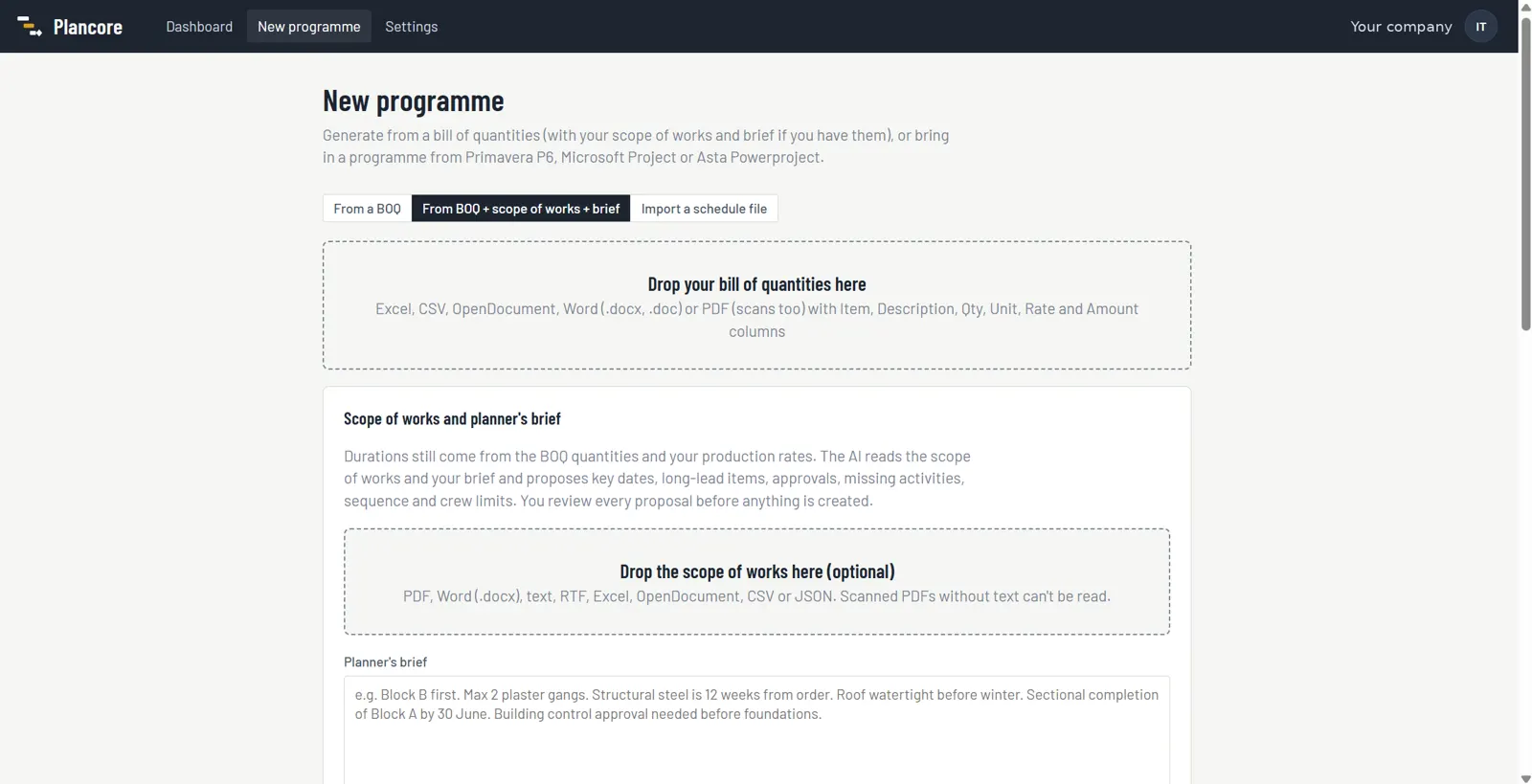
- No BOQ? Generate from a scope of work and the planner fills the quantities in the review step.
- Already have a programme? Import it from P6, MS Project or Asta and skip straight to checks and forecasts.
- Every rate is labelled with its basis: published figure, standard practice or planner-reviewed. Replace any rate with your own outturn data.
53 checks on every programme and update
Upload the monthly .xer, .mpp or .pp and Plancore compares it with the baseline and the last update in minutes. It catches compression, broken logic, changed actuals and delay risk before they become a dispute.
When will it really finish?
The CPM date says one thing and the site's performance often says another. Plancore puts three independent forecasts side by side so the gap shows up months earlier.
- Monte Carlo simulation. 500 runs of the remaining work give P50, P80 and P90 dates and the probability of meeting the contract date.
- Earned schedule. SPI(t) and an independent completion forecast from the rate of progress to date.
- Slip trend. Forecast completion across every update, and where the trend lands if nothing changes.
- Delay risk register. Activities ranked by float, slippage and progress against time elapsed, written in plain English.
Progress, cost and earned value from the same programme
Because the programme is cost- and resource-loaded from the BOQ, earned value works from day one. No separate cost model to keep in step.
Progress capture
Percent complete, actual starts and finishes, and remaining durations, entered in Plancore or imported from your updated P6, MSP or Asta file.
Earned value
PV, EV and AC with SPI, CPI, EAC and VAC, by WBS, trade or cost account. S-curves against baseline and forecast.
Resources
Labour and plant histograms by trade, peak demand and over-allocation flagged before it reaches site.
Delay and forensic analysis
Every update is stored, so Plancore can show exactly when the critical path moved, what drove it and by how much.
- As-planned versus as-built comparison across any two updates.
- Critical path shift tracking and window-by-window delay attribution.
- Logic and duration changes logged update to update, so retrospective "corrections" are visible.
- Evidence packs structured in a way familiar from the SCL Delay and Disruption Protocol, ready for your claims consultant or planner to finalise.
Want the analysis done for you?
Our planners prepare extension of time submissions, responses and programme recovery plans using the same data. See Services.
Reports that write themselves from each update
Set up the report once. Every new update produces it again, with the commentary drafted for the planner to edit.
Weekly and monthly reports
Progress narrative, critical path, key dates, look-ahead, checks summary, forecast and earned value.
Portfolio dashboard
Every project's health, risk and forecast completion on one screen, updated as files arrive.
BI feeds
A live OData feed to Power BI and Tableau, and automatic pushes to Domo, so your own dashboards stay current.
Regional calendars and productivity, built in
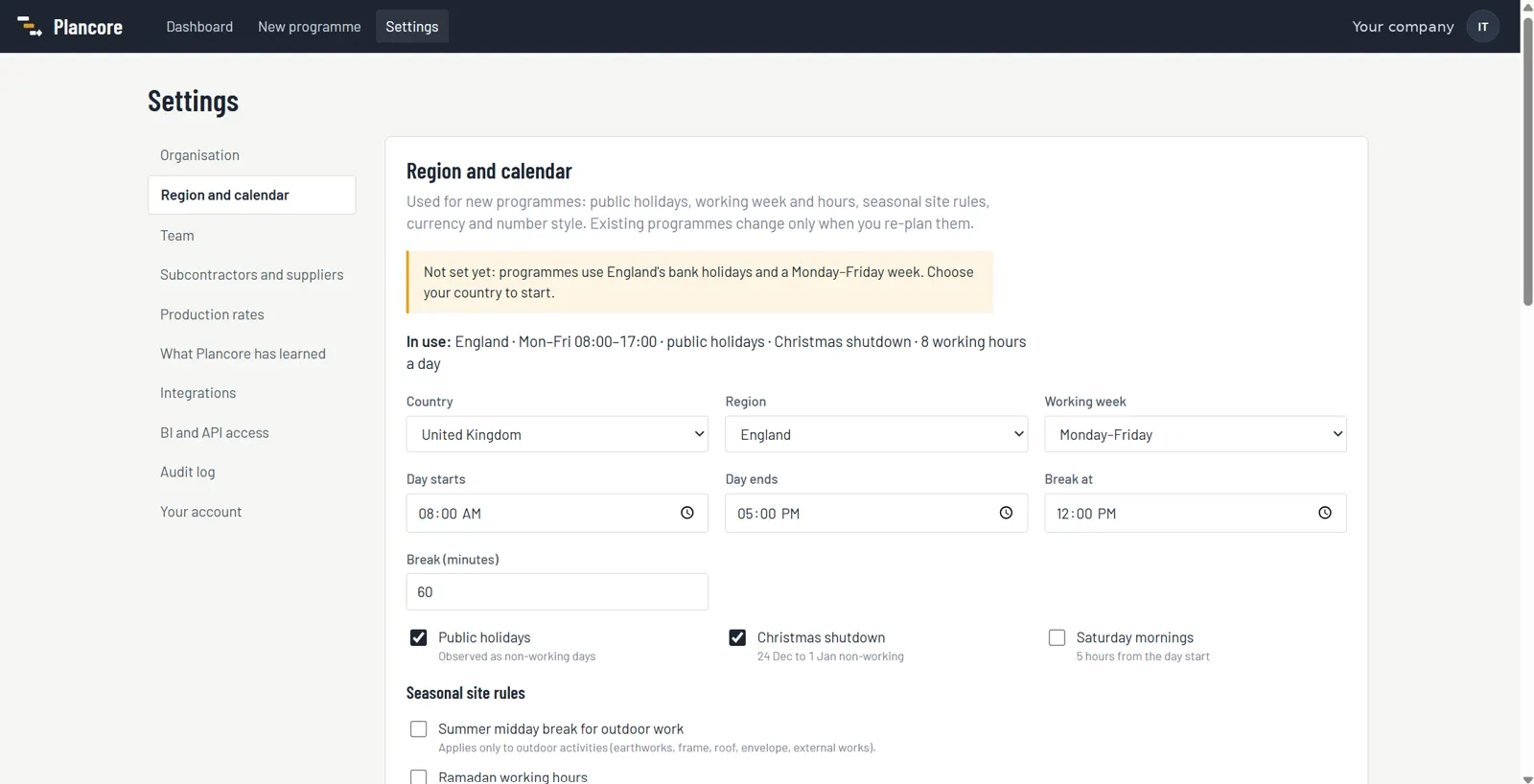
Pick the region and Plancore sets the working week, holidays, weather days and trade productivity, in calendars your planners can see and edit. Building somewhere else? Set your own working week, holidays and rates for any country.
United Kingdom 15 regions
- Week
- Mon–Fri, optional Saturday mornings
- Holidays
- England and Wales, Scotland, Northern Ireland
- Weather
- Rain, frost and crane wind days from Met Office averages
- Also
- Winter daylight; central London logistics
Gulf 6 countries
- Week
- Sat–Thu, 10 hours
- Holidays
- National days and Eid by country
- Heat
- Summer midday bans on outdoor work
- Also
- Ramadan hours; dust and shamal days
Africa West Africa built in
- Week
- Mon–Sat, 8 hours
- Holidays
- National and religious holidays, year-end shutdown
- Weather
- Rainy-season working days by region
- Also
- Blockwork, render and site-mixed concrete methods
Europe and elsewhere your settings
- Week
- Any working week and hours
- Holidays
- Your public holidays and shutdowns
- Seasonal
- Winter, summer and other site rules
- Rates
- Start from the library, adjust to local output
Built for the whole project team
Planners build and check. Site teams report progress. Directors ask questions in plain English. Plancore keeps them on the same programme.
Ask
Ask about the programme in plain English: what's driving the finish date, which activities slipped this month, what happens if the steel is late.
What-if scenarios
Test a resequence, an extra gang or a late delivery against the live programme and see the effect on completion before you commit.
Site app
Supervisors record progress from site on a phone, feeding the next update without a spreadsheet in between.
Schedule grade
Every programme gets a grade and score from the checks, so a director can see its quality at a glance.
What Plancore has learned
See the rate and logic adjustments Plancore has learned from your own projects, and keep or reject each one.
Subcontractors and suppliers
Keep your supply chain, their crews and lead times in one place for use in new programmes.
Works with the tools you already use
Plancore feeds P6, Asta and MS Project, checks what comes back and reports on it.
Oracle Primavera P6
Import and export .xer and P6 XML; connect to P6 EPPM.
Microsoft Project
Import .mpp and XML directly; export MS Project XML.
Asta Powerproject
Import .pp files; export XML or .xer for Asta to open.
Power BI and Tableau
Live OData feed of projects, activities, checks and risks.
Domo
Every update pushed to your Domo datasets.
Procore
Send the programme to a Procore project schedule.
Autodesk Build
Publish programme files to Autodesk Docs.
Teams, Power Automate, Zapier
A signed webhook after every update, baseline or import.
Your projects stay yours
Each organisation's projects are isolated in their own workspace, and every user has a role.
Viewer
Reads programmes, reports and dashboards.
Planner
Generates, edits, updates and exports programmes.
Admin
Manages projects, users and integrations.
Owner
Controls the organisation, billing and data settings.
See Plancore on your own project
Apply for the founding pilot: one programme and two months of updates, free.
For the teams that build small and medium projects
Enterprise scheduling AI is priced for the largest contractors. Plancore is built for the firms delivering most of the work, and for the clients and advisers who need to know those projects are on track.
What each team gets from it
Main contractors
Tender programmes in hours instead of days, contract programmes that pass the consultant's review first time, and monthly updates checked before submission.
Subcontractors and specialists
A credible programme for every package, fitted to the main contractor's tool and format, without hiring a planner per job.
Developers and clients
Independent checks on contractor programmes, an honest forecast of completion and early warning of slippage.
Consultants and employer's agents
Review a contractor's .xer or .mpp against 53 tests in minutes and send back a clear, evidenced response.
Planners and project controls
Hand the repetitive build and checking work to Plancore and spend your time on logic, strategy and the client.
Claims and commercial teams
Every update is kept, compared and explained, so the delay story is ready when you need it.
UK: Asta-first, NRM-native
Most UK SME contractors plan in Asta Powerproject or MS Project and price from NRM or SMM7 bills. Plancore reads those bills and exports to those tools.
- 15 regions, from central London logistics to Highlands weather.
- Bank holidays for England and Wales, Scotland and Northern Ireland.
- Rain, frost and crane wind days from Met Office climate averages; winter daylight hours.
- Programmes structured for JCT and NEC4 submissions, including the NEC Accepted Programme cycle.
Residential and housebuilding, education and healthcare buildings, commercial fit-out, civils and utilities, energy and renewables.
Europe: one planning standard across your projects
Contractors and consultants working across European markets need programmes that follow local working rules but meet the same quality bar. Plancore applies the same 53 checks and reporting wherever the project is.
- Set your country's working week, hours, public holidays and shutdowns.
- Seasonal site rules for winter working and summer breaks.
- Start from the production rate library and adjust it to local output.
- P6 and MS Project programmes ready for consultant and client review.
Commercial and residential buildings, fit-out, civils and infrastructure, energy and renewables.
Gulf: P6 programmes that pass consultant review
Gulf consultants expect detailed, resource-loaded P6 programmes and monthly updates. Plancore builds them with heat bans, Ramadan hours and local working weeks already in the calendars.
- UAE, Saudi Arabia, Qatar, Kuwait, Oman and Bahrain.
- Saturday-to-Thursday 10-hour weeks; summer midday heat bans by country, applied to outdoor calendars only.
- Ramadan working hours with an effectiveness allowance you can adjust.
- Values in local currency; checks aligned to the review points consultants raise most often.
Residential towers and villas, hospitality and fit-out, infrastructure and utilities, energy and industrial.
Africa: BOQ-driven programmes that respect the rainy season
Projects are priced from detailed bills, but programmes are often a bar chart drawn at tender. Plancore turns the bill you already have into a logic-linked programme built for local methods and weather.
- Built-in regional calendars for West Africa, with rainy-season working days by region; other countries set up from your settings.
- Rates for blockwork, in-situ RC frames, site-mixed concrete and cement render.
- Six-day working weeks, national and religious holidays, and the year-end shutdown.
- Values in local currency, with programmes ready for P6 or MS Project submission to consultants and public clients.
Residential and estate developments, commercial buildings, healthcare and education, roads and drainage, energy projects.
Places are allocated by region
We are taking a limited number of pilot projects in each market so our planners can give every one proper attention.
Your next programme, built free. Two months of updates, on us.
We are opening Plancore to a limited number of contractors, developers and consultants. Send us one live or upcoming project. Our planners and the platform build the programme, then run your progress updates for two months at no cost.
- Built from your BOQ, scope of work and drawings
- Logic-linked critical path, WBS, calendars, resources and costs
- Regional working week, holidays and weather built in
- 53-check quality report on the baseline
- Reviewed and signed off by a senior planner
- Delivered in P6, MS Project or Asta format, plus Excel
- Weekly or fortnightly updates, your choice
- Progress statused from your site returns
- 53 checks against baseline and last update
- P50 and P80 completion forecasts
- Earned value where the programme is cost-loaded
- A progress report with every update
How the pilot runs
About three months from application to the end of the free update period.
Build time depends on project size and the documents provided; we confirm it at kick-off.
Who the pilot is for, and what we ask in return
Your project should be
- In the UK, Europe, the Gulf or Africa
- A small to medium project in buildings, civils, energy or fit-out
- Starting, or already on site, within the next three months
- Backed by a BOQ, a scope of work or an existing programme
- One where you can share progress each update period
In return, we ask you to
- Name one contact who can share documents and progress
- Join a short feedback call each month
- Let us use the project data, anonymised, to improve Plancore's rates and logic
- Tell us honestly what worked and what didn't
- Optionally, let us write up the pilot as a case study, with your approval
How pilot data helps Plancore learn
Every programme our planners correct, and every update that shows how the site really performed, makes the rates and logic more accurate for the next project. Here is exactly how we handle it.
Kept in your workspace
Your project files sit in your organisation's own isolated workspace. Other customers never see them.
Learned from in aggregate
We extract quantities, durations, logic patterns and outturn performance, stripped of names, locations and commercial values, to refine the models.
Covered by written terms
Pilot terms and an NDA are signed before you send anything. You can ask for your files to be deleted at the end of the pilot.
Pilot questions
Is it really free?
Yes. The programme and two months of updates cost nothing, and there is no obligation to subscribe afterwards.
What happens after two months?
We review the pilot with you. If you want to carry on, we'll offer a subscription or a managed planning service. If not, you keep the programme and every report we produced.
Do we need P6, MS Project or Asta licences?
Only if you want to edit the programme yourself. We deliver PDFs and Excel too, and every report is readable without scheduling software.
Can we use an existing programme instead of a BOQ?
Yes. We import it, run the baseline checks, fix what needs fixing with your agreement, and then run the updates.
How many places are there?
A limited number in each region, so our planners can give each project proper attention. Applications are reviewed in the order they arrive.
Apply for a pilot place
Takes about three minutes. We reply within two working days to arrange a short qualifying call.
Application received
Thanks. We'll be in touch within two working days to arrange a short call. In the meantime you can reach us at demo@plancoresystems.com or +442046307555.
Professional assurance from the planners behind the platform
When a programme has to stand up to a client, a funder, an adjudicator or a board, you need more than software. The engineers, project managers and planners who built Plancore validate, analyse and control programmes for you, using the platform to work faster and check everything twice.
Assurance and validation
An independent, evidenced view of whether a programme is realistic, compliant and fit to rely on.
Programme validation
Review of a baseline or update against the 53 checks and the contract requirements, with a graded report and a clear list of what to fix.
Independent assurance for clients and funders
Monthly or milestone reviews of the contractor's programme and progress, so you know the real completion date before it is reported to you.
Forensic and delay analysis
When time is in dispute, the analysis has to be traceable to the updates and defensible under scrutiny.
Delay analysis and extension of time
Critical path and windows analysis, delay attribution and the evidence behind an extension of time claim or its defence.
Programme recovery
For jobs that have slipped: what is driving the delay, what can be recovered, and what recovery will cost.
Ongoing project controls
A planning and controls function for your project or portfolio, without building one in-house.
Managed progress updates
We status the programme from your site returns every week or month and send back the update, the checks, the forecast and the report.
Reporting and earned value
Cost loading, earned value, reporting packs and Power BI dashboards, set up once and fed from every update.
Tender and contract programmes
Programmes for bids and contract award, in your preferred tool, built from your BOQ and method and checked before your client sees them.
Planner on demand
A senior planner for a defined period, for a tender peak, a difficult client or a programme that needs rescuing.
Planning training
Primavera P6, Asta Powerproject and Microsoft Project, taught by practising planners using real project data, on site or online.
Tell us about the project
We'll tell you whether it needs the software, our assurance team, or both.
Written by planners, for planners
Plancore exists because good planners spend too much of their time rebuilding the same programmes and checking the same mistakes, and most small and medium projects never get a planner at all.
Decades on site, now in software
Engineers and builders
Plancore was founded by engineers, project managers and builders with several decades of experience delivering projects, from site to programme to handover.
Planners and project controls
Experienced planning engineers and project controls specialists, long-standing users of Primavera P6, Asta Powerproject and Microsoft Project, specify the scheduling logic, rates and checks.
Tested on real projects
The team validates every generated programme in all three tools against real BOQs, scopes and schedules from their own careers, and corrects the platform when it gets something wrong.
"Every duration Plancore produces has to survive the same questions we'd ask a planner at a programme review."
How we build it
Show the working
No black boxes. Every duration, link and forecast can be traced to its source.
Respect the planner's tools
We feed P6, Asta and MS Project. We don't ask anyone to abandon them.
Only claim what works
Features in development are labelled as such. Integrations in pilot say so.
Learn from real sites
Rates and logic improve from outturn data on real projects, with consent and anonymised.
Questions planners ask first
Does Plancore replace Primavera P6, Asta or MS Project?
No. It generates and checks programmes and exports them to those tools, where your planners keep working. Updates come back as .xer, .mpp or .pp files for analysis.
Can I trust the dates it calculates?
The scheduling engine reproduces Microsoft Project's own finish dates on real .mpp files, and programmes round-trip through P6 .xer with every date unchanged. Every duration shows the quantities and rates behind it.
Where do the production rates come from?
A library of 140 rates across buildings, civils, energy and fit-out, each marked with its basis: a published figure, standard practice or a planner-reviewed seed. Replace any rate or regional factor with your own outturn data.
Does it read drawings?
Drawings are used as reference to check scope, zones and sequence. The BOQ is the source of truth for quantities, because that is what you priced and what you'll be measured against.
Can I analyse a programme I already have?
Yes. Import a P6, MS Project or Asta file and Plancore runs all 53 checks and the forecasts. No BOQ needed.
Is our data kept separate from other companies?
Yes. Each organisation's projects are isolated, and access is controlled by role: viewer, planner, admin or owner.
Which countries does Plancore work in?
We work with teams across the UK, Europe, the Gulf and Africa. 26 regional calendars are built in, covering the UK, the six Gulf states and West Africa, and you can set up the working week, holidays and rates for any other country.
Do I need your planners, or can my team use it alone?
Either. Many teams use Plancore as an affordable tool to run their own projects. Others bring in our planners for validation, forensic analysis or ongoing project controls. You can start with one and add the other.
How much does it cost?
Subscription pricing is being finalised with our founding pilot partners. Apply for the pilot to use it free on a live project now.
Talk to a planner
Questions about the platform, the pilot or our assurance services. A planner reads every message.
demo@plancoresystems.comFor pilot applications, use the pilot form so we have your project details.
Phone
Registered office
Plancore Systems Ltd
167-169 Great Portland Street
5th Floor
London W1W 5PF
United Kingdom